Showing posts with label art. Show all posts

Thursday, July 25, 2019

Not-So-Modern Art

Recently I was going through boxes of old photos & papers at my parents' house, and I found this. It's the earliest known drawing by me! According to the writing on the back, I created this masterpiece when I was all of two years old.

Obviously this was done during the Blue Period of my abstract phase. Trouble is, I'm not quite sure whether it's right side up or not.

I think it'd fit in pretty well in a museum, if I do say so myself!

Tuesday, June 21, 2016

Art In The Wild!

I was browsing in my local comic bookery last week, and imagine my surprise when I walked past the gaming section and spotted my RARRR!! game on the shelf! Cool!

OK, so technically it' s not my game... it's published by APE Games. They're a Texas-based company that's been manufacturing fine board and card games since 1977.

But I did create just about all the art for the game a couple of years back. You can read all about that particular project here. Apparently the game has just been reprinted, hence its appearance on the shelves.

Imagine, my monster art is sitting there on the shelf next to Star Trek and Minecraft games! I'm somebody! I'm finally somebody!

Of course now that I've spotted my game in the comic shop, I'm going to become obsessed with it and check to see if both copies are still there every time I go in. And of course if they are, I'll immediately become despondent and hide under my desk all weekend.

In order to prevent that, I suggest you all immediately check your local comic shop for the RARRR!! game, or better yet, order it directly from the APE Games site.

Sunday, October 18, 2015

UPDATED Doctor Who Pinups

Way back in 2010 I started a series of vector drawings of all the various incarnations of the Doctor (there were eleven at the time). Now that I've had a few more years of experience in working with vector, I decided to update them all and fix some things that were bothering me about them. And to add the recently introduced War Doctor and the Twelfth Doctor to the mix.

Please forgive the ugly watermark on the illustration. I swore I would never add one to my art, because I know that 99.99% of my readers would never even think of stealing it. But earlier this year I had a run-in with an art thief who was not only stealing my work, but selling it as her own! Hence the watermarks. This is why we can't have nice things.


Tuesday, September 1, 2015

Hands-On Exhibit!

From the Tapei Huashan 1914 Creative Art Center's official brochure: 

Welcome to the Tapei Huashan 1914 Creative Art Center, the world's first hands-on fine art museum! 

Why be corralled behind a velvet rope like a dull-eyed cow and stare at stuffy old paintings from a distance, when you can experience, firsthand, the texture of every brush stroke?

Go ahead, run your fingers over our delicate, fragile canvases. Don't be shy! Get your fingertips in there and really caress that crumbling, centuries-old impasto. Feel that? That's genuine antiquity you're fondling!

Yes, at the Tapei Huashan 1914 Creative Center, you'll feel art history come alive!

What's that you say? What happens if you accidentally take a tumble and shove your fist through a four hundred year old painting, such as Flowers by renowned 17th century Italian Baroque artist Paolo Porpora?

No worries! Our crack staff of experts can restore even the most severely and clumsily damaged canvas in no time flat. Why just look at that painting! It's better than brand new!

Don't forget, Saturdays are Kids Daze here at the Tapei Huashan 1914 Creative Center. Children twelve and under are encouraged to paint directly onto our canvases, and "improve" them! 

Thursday, January 29, 2015

Tut Tut!

This week the art world was aghast when the mask of King Tutankhamun, the world's most priceless archeological treasure, was irreparably damaged after a botched repair attempt.

According to officials at the Egyptian Museum in Cairo, the mask's pointed, jewel-encrusted beard recently snapped off during an attempt to clean it last October. Other reports say the mask was removed because it was loose.

However it happened, the museum, desperate to get the popular attraction back on display, chose not to call in a professional restoration team and attempted to repair it themselves. 

Unfortunately they did this by slathering the end of the beard with epoxy and accidentally smearing it all over the gold face of the mask. They then tried to scrape the excess epoxy off with a spatula, permanently scratching the 3,300 year old face of the mask.

The museum is currently dimming the lighting around the display to obscure the damage. Ah, that's much better! No one will ever notice if you turn out the lights!

The museum refused to reveal the identity of the person responsible for the damage, but according to sources, this isn't the first time he's damaged a priceless museum artifact. 

Here he is in 1997, when he attempted to clean and restore James McNeil Whistler's Arrangement In Grey And Black No. 1, better known as Whistler's Mother.

Wednesday, June 25, 2014

This Week In Awkward And Inappropriate Book Covers

As most comic book fans are aware, there are wiseacres out there on the interwebs who like to snicker and point at Batman and Robin, insisting that they (and any superhero character with a teen sidekick) must surely be gay. 

Hardee har.

Despite the fact that Robin was created in a more innocent time as an audience surrogate, these wags are insistent that there's a hidden and perverted subtext to the comics, and no amount of argument can dissuade them of this notion.

I don't know where they get such ideas.

Certainly not from this upcoming collection of Frank Quietly's DC artwork. Just look at that wholesome, tasteful cover depicting Robin spreading his creamy white thighs and thrusting his lovingly rendered crotch at the viewer's face, while an unshaven, seedy looking Batman leers smugly from behind.

Nope, nothing salacious or untoward going on here. Move along!

Wednesday, January 22, 2014

Dr. Killdeath & Count Gothula's Venomous Christmas Step By Step

Now that my 2013 Xmas Card Slash Book is finally finished I thought I'd post a step by step look at how I work for the two or three people out there who may be interested.

I picked a page featuring both the main characters, so you can see how I drew the two of them.

It all starts with a sketch of course. Sometimes I sketch with pen and paper, sometimes I sketch right on the screen in Photoshop. This is a pen and paper sketch. I scanned the pen and paper sketch, then dropped it onto a page in Photoshop. I then typed in the text below.


The entire book was created in Photoshop, by the way (with the exception of the cover logo, which was done in InDesign).

The original sketch of the characters looked a bit wonky (artist's term meaning not very good) so I did a second, digital sketch. This one came out a lot better, as the characters are much more on-model. The sketch is on its own layer, so I can change its transparency and turn it off when it's no longer needed. 

I use a lot of layers on these drawings. A lot. Like 75 or more for a page like this. Layers are your friend. When you use a lot of layers, it makes it easier to change elements when you inevitably decide to do so.


Next I added a background color, complete with a sloppily-painted gradation in the center. Don't worry, I made it sloppy on purpose, to mimic the feel of a painted kid's book.

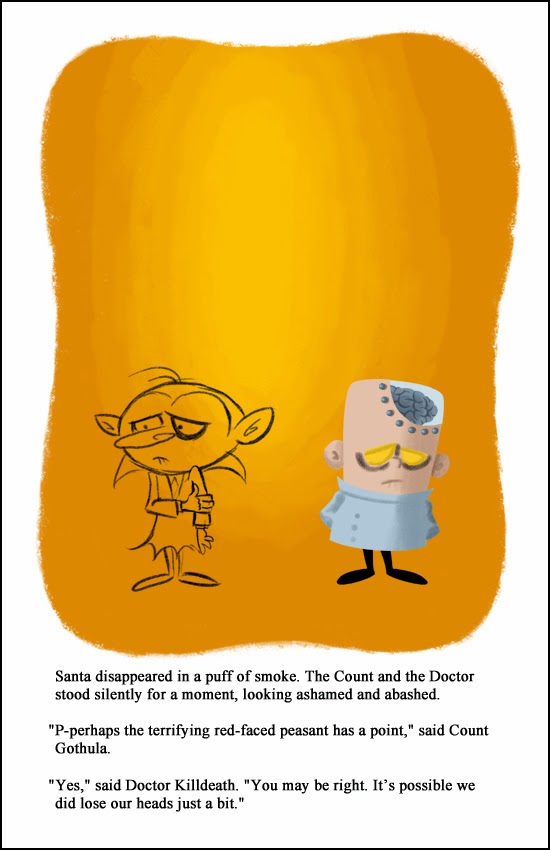
I then started blocking out Dr. Killdeath's shapes, starting with his head. I added shading and other appropriate details as well.

In actual practice I would lower the transparency of the sketch layer and then use it as a guide to draw the colors underneath it. I thought that would be too confusing here though, so I deleted it. If you want, just pretend you can still see the Dr. Killdeath sketch.


I then blocked out the Doctor's body and legs. All these elements are on different layers, of course.

Next I added the Doctor's glass dome and the rivets that fasten it to his skull. The dome is on a layer underneath his head.

I drew his brain next, on its own layer.

As I mentioned in the Behind The Scenes post, I seem to have a lot of trouble drawing brains and getting all the fiddly little folds to look just right. So once I drew the Doctor's brain once, I copied and pasted it on every page. Yep, Dr. Killdeath's brain is the exact same piece of art throughout the entire card slash book.


Next I added the fiddly little brain folds I just spoke of.

And then I added the bubbles, to help sell the idea that his brain is floating in some sort of nutrient tank. The bubbles were on their own layer of course, and I dialed down their opacity so they'd be semi-transparent.

Next I added the inside of his head, behind the brain. It's a subtle thing, but it makes him look a bit more three dimensional instead of a flat cartoon.

Then I added some defining lines to his head and body. I let the shapes beneath the lines define their color. For example, the Doctor's lab coat is a light blue, so the coat's lines are a darker blue. 


Colored lines give the piece more visual interest than plain black ones would.

The next thing I added was a white glare to his glass dome. It's kind of hard to see here, so you may have to zoom in.

Then I added some red on his forehead, nose and cheeks. The red's on its own layer, so I could adjust the transparency. It's amazing to me how just a little touch of red can add a ton of life to a character.

Lastly I added a white outline around the Doctor. I started doing that a few years ago with the Santataur Is Comin' To Town card slash book. It helps make the character pop a bit and separate them from the background.

The outline is on its own layer, and I think I dialed down the opacity to 85%.

By the way, here are all the layers it takes to make Dr. Killdeath. 14 in all. Actually that's a pretty low count for me. Some of my characters are made of two or three times that many layers.

Still, 14 is a lot, and it can get confusing when you're searching through the menu for a particular layer. That's why I arrange all my layers inside folders. It takes a little extra time to set up, but it's worth it in the long run.

Plus you place all the layers inside a folder, it acts like a single layer. You can move the folder, scale it or change its opacity and all the contents will react accordingly.

So that's it for Dr. Killdeath! On to Count Gothula.

I started on the Count by blocking out his head (on a separate layer).

By the way, I had electronic model sheets of both characters that I could refer to, to help me draw them the same way on every page. I used the eyedropper tool in Photoshop to sample their various skin and clothing colors to make sure those were consistent as well.

Next I drew the Count's body and legs.

And then I added his red collar on another layer. I used the pen tool to draw the collar. It was a lot quicker than trying to paint the curves with a brush. With 28 pages to draw I had to save time wherever I could.

Next I added his right arm.

And then-- you guessed it-- his left arm.

Once again, by putting all these parts on their own layer, it's a lot easier to make changes. For example, if the Count's entire body was on the same layer and I decided I wanted to redraw his right arm and hand, I'd end up erasing most of his body in the process.

But because his arm is separate, changes made to it don't affect the parts underneath.

Then I added the colored defining lines to him. Count Gothula always gets two stray hairs on top of his head.

Next I added the Count's facial spots. I'm not exactly sure what these are supposed to be or why they're there. Maybe they're some kind of vampire liver spots? Whatever they are, he didn't look complete without 'em.

The spots were in a specific pattern that's the same on each page. Three in the lower left corner of his face, one in the upper left corner, and then two in the upper right.


I know what you're thinking right now: "Bob's got Aspergers!"


Then the Count get a bit of red on the end of his nose. It's on a layer with the opacity dialed down, just like the Doctor's.

And lastly I added the outline around the Count.

OK, so much for the characters. Now let's tackle the background.

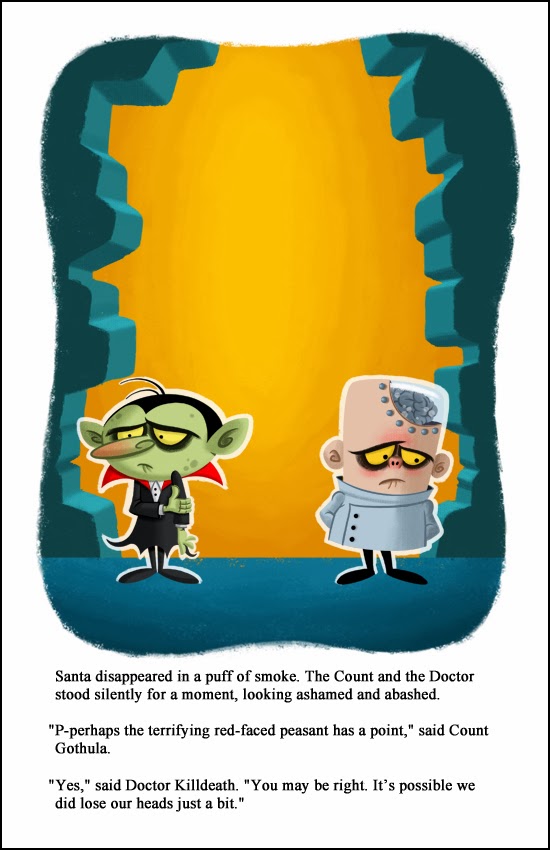
Now that the characters were done, it was time to start on the background. I added a new layer and drew a floor.

Next I added another layer and painted in the shattered walls on both sides of the page.

I then locked that layer so that the brush would only affect the walls. Then I started shading the walls to give them some depth.

I wanted it to look like light was streaming in from outside, so I added wall shadows to the floor.

Next I painted in some rubble on the floor, to sell the idea that one of the Doctor's "gifts" had knocked a hole in the castle wall.

And then I added the shadows cast by the rubble.

And I added the shadows cast by the Count and the Doctor. All of these shadows are on separate layers of course, so I could play with the opacity of them.

We're in the home stretch now!

Next I added the dissipating image of Santa. The idea here is that Santa, who figured prominently on the page before this, has now teleported back to the North Pole, and what we're seeing here is his ghostly afterimage.

The Santa Cloud was drawn on its own later with a rough, scratchy brush. I made the Cloud orange to suggest fire and brimstone.
Next I played around with the Santa Cloud, using Photoshop to warp and skew it like it's made of wispy smoke. I also adjusted the opacity to make it look like it's slowly fading away to nothing.

Lastly I added yellowing and aging effects to the page, as if it were from a thirty or forty year old book. Needless to say, these aging effects were on their own layers. You have to restrain yourself when you're adding aging to something, as it's very easy to go overboard. In fact I may have gone too far here.

I have a confession to make: these aging effects-- the yellowish tint and the dark smudges-- are the exact same ones I first created for 2009 Christmas Card. I've been reusing them ever since. Hey, they work, so why waste time recreating them? Why not recycle them?

And voila! Only 32 simple steps from start to finish. Actually there were many more steps to drawing the page than I've shown here; these are just the major ones! Then I repeated the process 27 more times and before I knew it I had a book!


Related Posts with Thumbnails
 
Site Meter